
Nexus Agile. Enterprise agile thinking, from strategy to sprint.
The high-level delivery platform for teams that answer to management. Squad roadmaps, releases, risks and sprints in one cockpit, a live executive dashboard your chairman opens without an account, and an Intake page where the business sends its requests and follows them to done. Keep the detail in Jira if you like: Nexus Agile is the view above it.
How does your team run agile today?
Make it one cockpit.
The plan, the work, the meetings and the reporting usually live in five tools that never agree. Nexus Agile holds all of it in one place, so the number on the management slide is the number on the board.
Watch
Nexus Agile in 68 seconds
From the overview to the program board, on real screens.
For leadership · Executive dashboard
Your chairman sees delivery live.
No login. No slides.
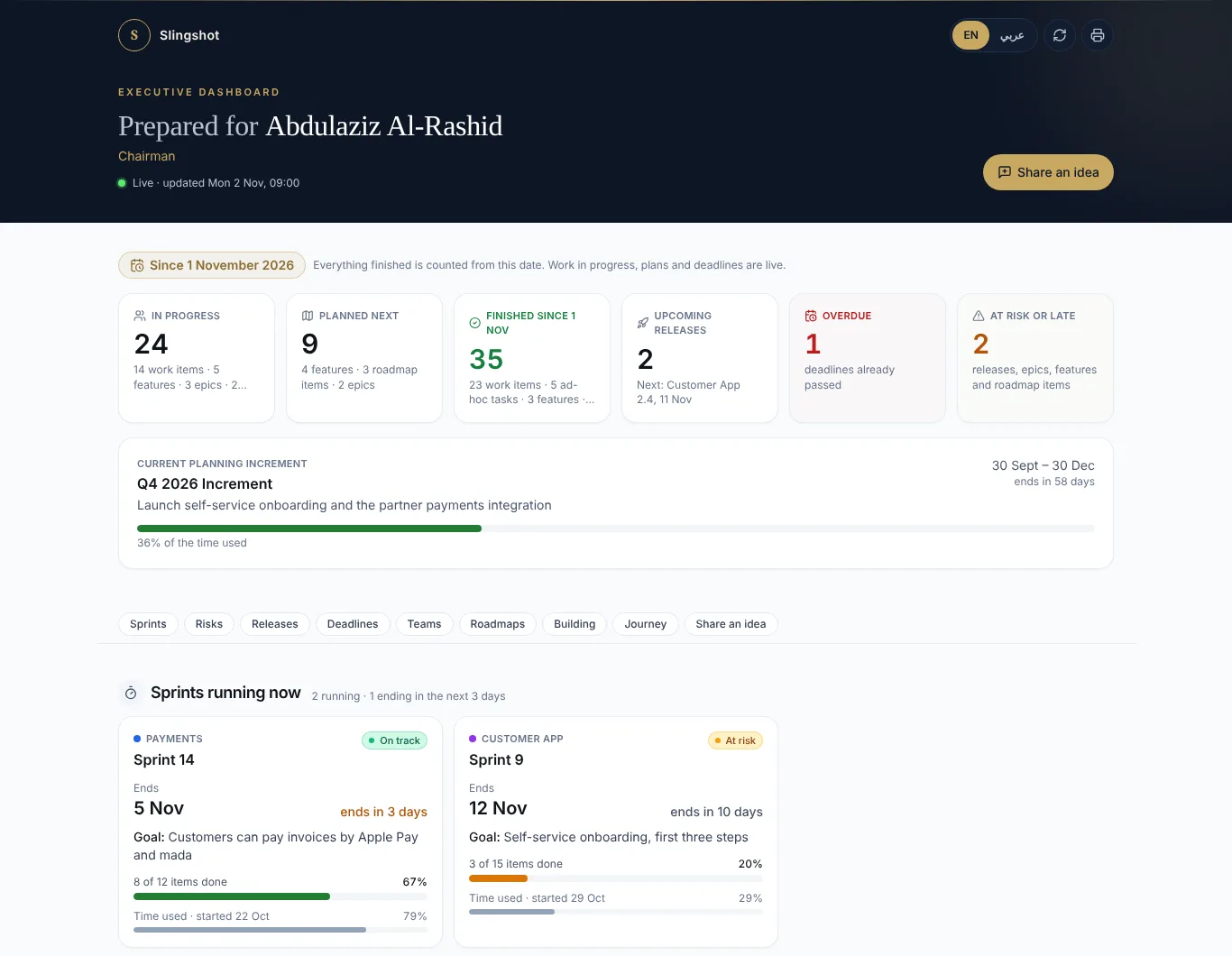
Send each executive a personal invitation. They open one calm page on their phone or laptop: what the squads are busy with, what finished, what is next, which dates are at risk, and where the team needs a hand from management.
Personal VIP invitation
A private invitation email for each executive, in English or Arabic. One link, no account or password. Revoke it any time.
Roadmaps, Now to Done
Every squad roadmap in Now, Next, Later and Done, with a squad and roadmap switcher.
Risks & support needed
Open risks with their mitigation plan, and the exact help the team needs from management.
What the teams are busy with
Sprints running now with goal and days left, plus the ad-hoc work that never makes a sprint.
Share a thought
Executives send an idea straight from the dashboard. It lands in the team’s inbox and can go to the backlog in one click.
Where we started
A baseline of what was done before Nexus Agile, next to everything delivered since.
Who viewed
See when each executive opened their dashboard, and on which device.
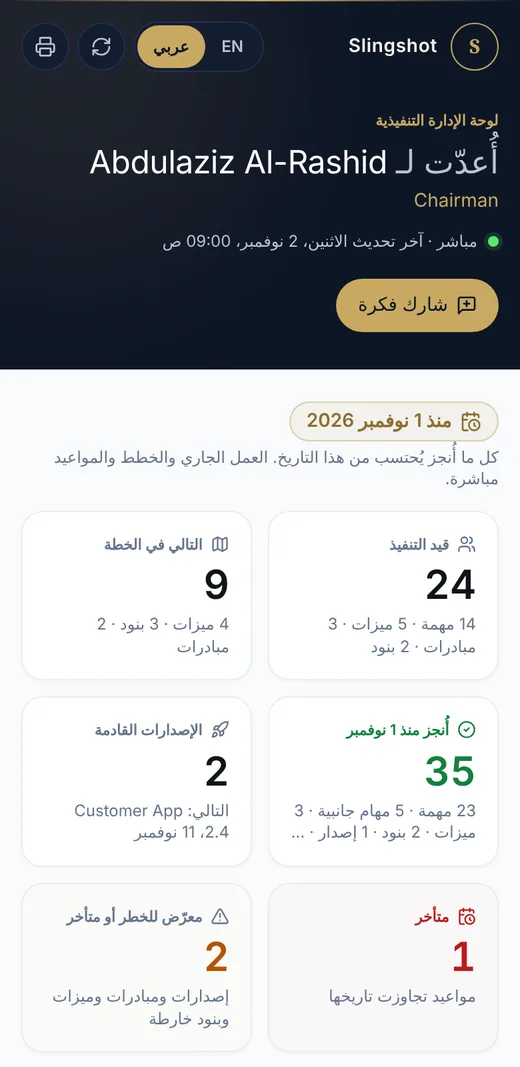
Arabic & English
The whole dashboard in Arabic, right to left, or English. Readers switch with one tap.
For the business · Intake
Business requests, out of email and spreadsheets.
Give the business team, finance or operations their own personal link. They send what they need from their phone and follow every request to done. The team decides where each one goes, and both sides talk in the comments.
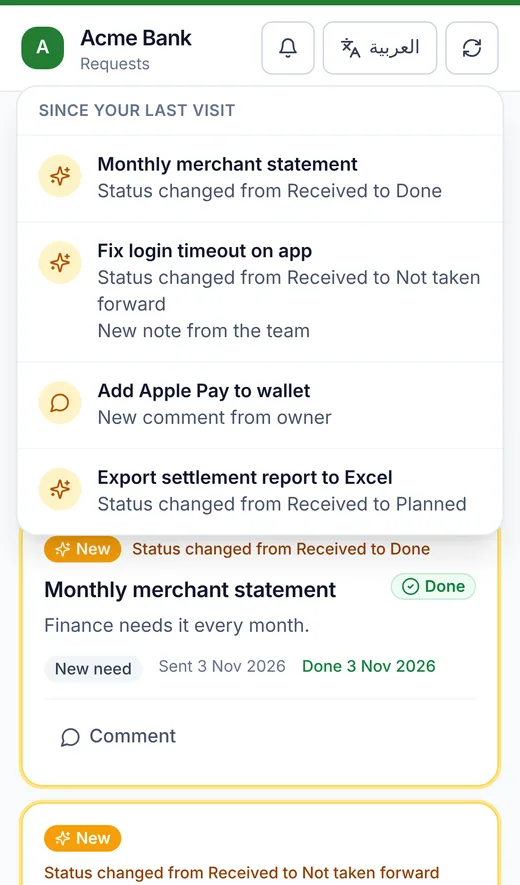
What changed since their last visit.
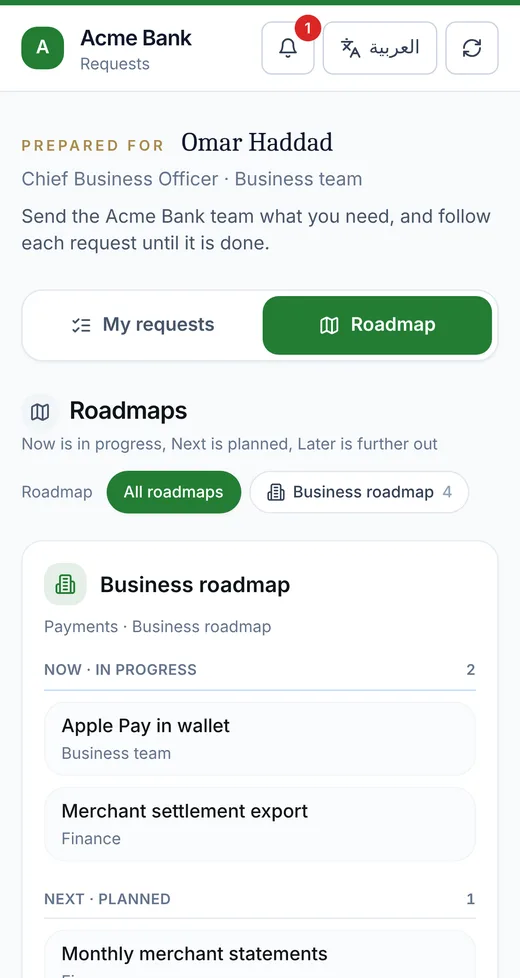
The roadmap, from the same link.
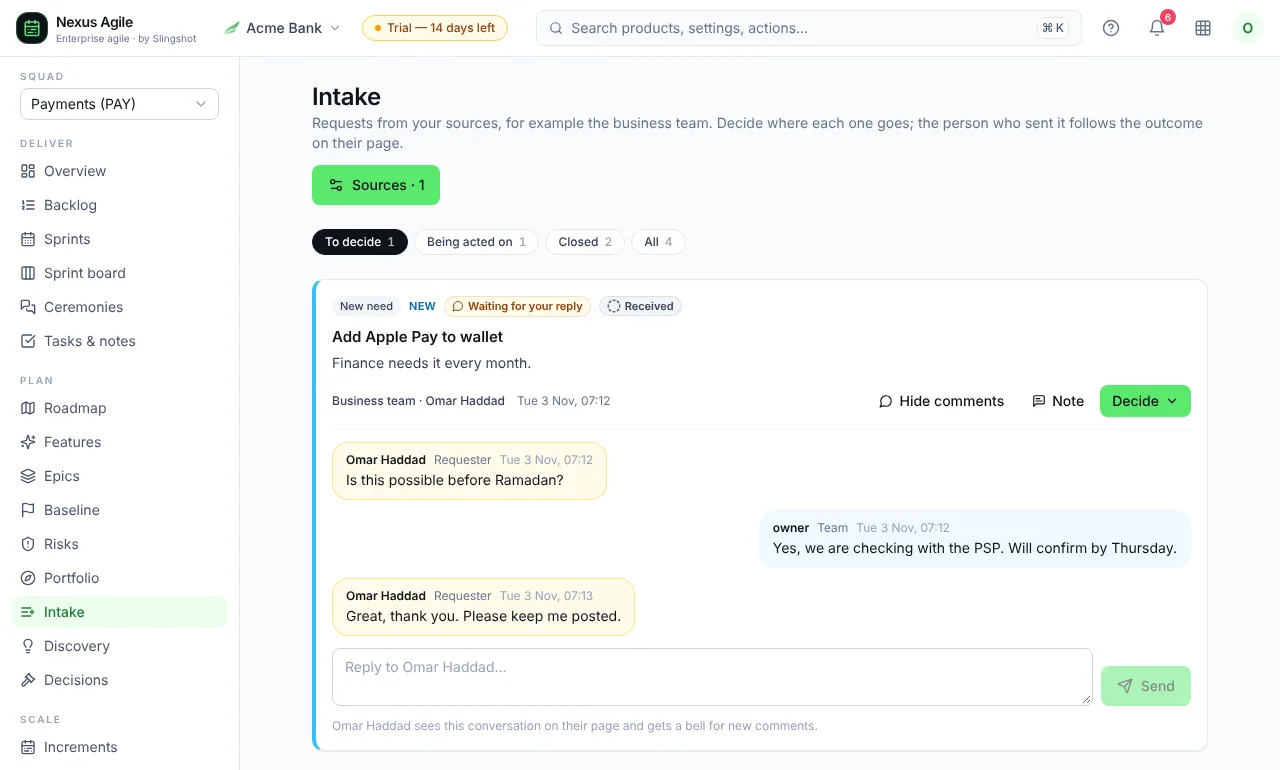
The team side: reply, add a note, and decide where the request goes.
Personal no-login links
Name a source, such as the business team, and share it with one person by link or VIP email. Nothing to install, nothing to remember.
Decide where it goes
Explore it in Discovery, add it to a roadmap or the backlog, mark it done, or decline it with a note the requester can read.
Status they can trust
Received, Planned, In progress, Done. Read live from the work itself, so nobody has to update it by hand.
Comments both ways
Requesters and the team talk on each request. Comments on the backlog item show up on the requester’s page too.
A bell for what changed
New comments and status changes are highlighted on their next visit. Filter by Open, Done or All.
The roadmap, from the same link
Requesters switch from My requests to Roadmap and see what is now, next and later across the squads.
Works alongside Jira
Keep the tickets where they are. Run the picture here.
Engineers can keep the fine detail in Jira, Azure DevOps or GitHub. Nexus Agile is the enterprise layer above it: squad roadmaps, releases, risks, business requests and the executive view. Closed work shows as a simple green Done.
- One picture across every squad, even when each team uses its own tool
- Plain language for management: Now, Next, Later, Done
- No empty numbers: tiles with nothing to show stay hidden
- Buy it on its own. No CRM needed.
Every level in one place
Think at every level. Plan in one tool.
Every story knows the sprint, increment, epic and strategy it serves. Leadership reads it top-down, the team works it bottom-up.
- 01
Strategy
Themes and goals
- 02
Portfolio
Epics across teams
- 03
Increment
PI objectives & features
- 04
Sprint
Committed stories
- 05
Story
Tasks, sizes, done
A look inside
The screens your team will live in.
01 · Overview
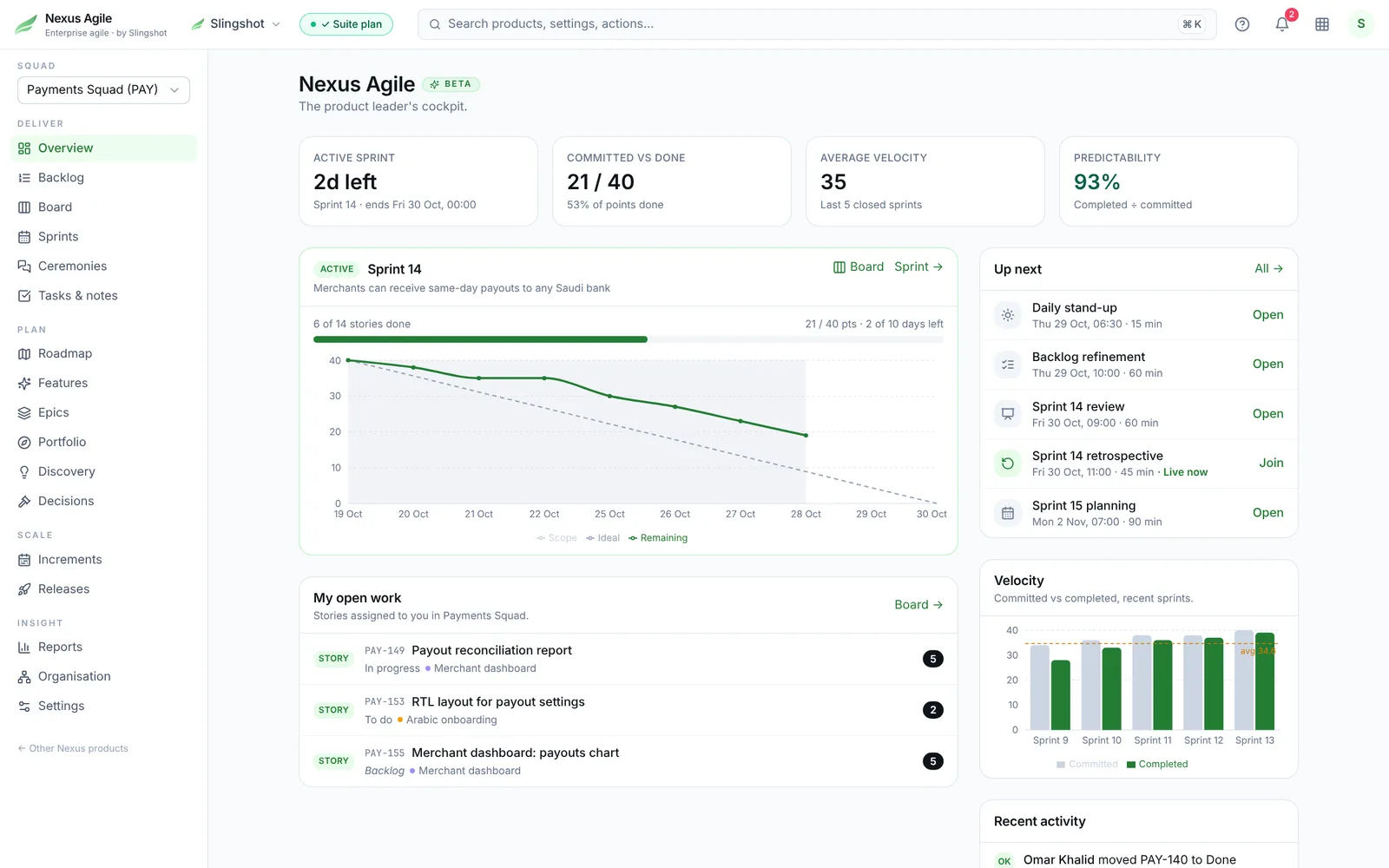
The sprint at a glance. For everyone.
Open Nexus Agile and the state of the sprint is already on screen: days left, committed against done, velocity, predictability and what is on the calendar next.
- Live burndown against the ideal line
- Velocity over the last five sprints
- Your own open work, one click from the board
Also new in Nexus Agile
Grown up for real delivery teams.
Baseline
Record the work done before you adopted Agile and your start date, so progress is measured honestly.
Release management
Plan releases, tag stories, and filter the backlog and board by release. Released means a clean green Done.
Risk register
Severity, owner, mitigation plan and the support needed from management, in one list.
Board or list, per sprint
Every sprint has its own board and list view, with a full-width mode for big screens.
Burndown that tells the truth
Counts items when nothing is estimated, shows today live, and skips non-working days.
Drag on phone and tablet
Press and hold to drag cards on the board, backlog and roadmap, with touch as smooth as a mouse.
Per-product roles
Team leads, product owners and members each get the right access, product by product.
Simple backlog
A clean ranked list, and a Top priority first button that sorts the board from urgent to low in one click.
Scrum, Kanban or SAFe
Pick the level you run at. See only that.
Each team chooses its method. A Kanban team never sees sprint screens, and a single Scrum team is not buried under program boards.
Kanban
Continuous flowNo sprints, just flow. For support, platform and ops teams.
- Board with WIP limits
- Cycle time and throughput
- Cumulative flow
Scrum
One team, sprintsThe full sprint cycle for a product team.
- Backlog, sizing and capacity
- Sprint board, burndown, velocity
- Planning, stand-up, review and retro
SAFe
Teams of teamsProgram increments for several teams delivering one product.
- PI planning and program board
- Dependencies and ROAM risks
- PI objectives and inspect & adapt
What’s inside
From the strategy deck to the stand-up.
Strategy & roadmap
Themes, epics and a now / next / later roadmap that ties every sprint back to why.
Increments & releases
Program increments, PI objectives, release plans and release notes — the plan your stakeholders actually read.
Sprints & backlog
Backlog, sizing, capacity, sprint board with WIP limits, velocity and burndown.
Every ceremony, inside
Stand-up, planning, refinement, review, retro and PI planning — each with its agenda, timebox, decisions and actions.
Product thinking
Discovery, hypotheses, decisions and acceptance criteria next to the work — fed by customer feedback from Nexus VOC and Helpdesk.
Reporting for management
A live executive dashboard with personal no-login links, plus sprint, release and PI reports, predictability and flow metrics, PDF and a weekly digest.
Intake from the business
Personal request links for business teams, a Decide flow for the delivery team, comments both ways and live status to Done.
Risks & releases
A risk register with mitigation and support needed from management, and release management with release tags on every story.
Who it is for
Built for teams that answer to management.
ICT departments
Run every internal delivery team on one method and show leadership one picture of what shipped.
Banks & financial services
Program increments, dependencies and risks across squads, with an audit trail on every change.
SaaS companies
Roadmap to release in one place, with pull requests linked to the stories they deliver.
Tech-product teams
Discovery, specs and sprints side by side, so the team builds what customers asked for.
Bring Nexus Agile to your team.
Start a free trial and set up your first squad in minutes. Nexus Agile stands on its own, so there is no CRM to buy first. Rolling it out across a tribe or a whole ICT department? Leave your work email and we will run a walkthrough on your own way of working.
Start free trialProtected by reCAPTCHA. Google's Privacy Policy and Terms of Service apply.
Prefer to talk? hit@eslingshot.com or send a message.
Looking for CRM, quotes, helpdesk and HR for a small business? See Nexus SMB.